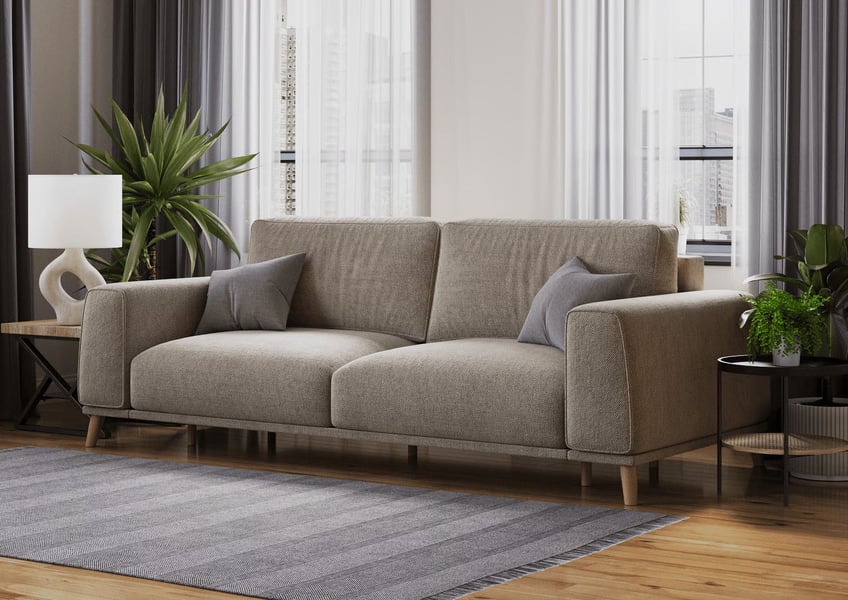
When building out a furniture product's image suite, brands consistently face the same question: should the focus be on clean silo renders, styled lifestyle scenes, or some combination of both? It's not a trivial decision — different image types perform very differently depending on the platform, the position in the image carousel, and what the shopper is trying to accomplish at that moment. Understanding the distinct roles of each image type is the foundation of a high-performing furniture eCommerce image strategy.
What Is a Silo Render?
A silo render — sometimes called a white-background render or a packshot — shows the furniture product alone, against a pure white or neutral background with no contextual props, room elements, or environmental styling. The entire visual weight of the image rests on the product itself: its shape, proportions, color, material finish, and detail.
In 3D CGI production, a silo render is produced by placing the furniture model in a controlled lighting environment with a white infinite backdrop. The result is a technically precise representation of the product that allows shoppers to examine it without distraction. Every curve of the frame, every seam in the upholstery, every finish variation on the wood is visible and unambiguous.
Amazon requires the main product image to have a pure white background (RGB 255,255,255) with the product filling at least 85% of the frame. Most major furniture marketplaces — Wayfair, Houzz, and many wholesale catalogs — have similar requirements. Silo renders are built to satisfy these specifications natively.
The silo render's primary job is marketplace compliance and product clarity. It gets the product in front of the shopper at the top of the search results page — and it does so by presenting the product exactly as specified by the platform's listing requirements. Our silo rendering service is optimized to deliver marketplace-ready images at the resolution, color profile, and framing specifications required by each major platform.
What Is a Lifestyle Render?
A lifestyle render places the furniture product in a designed interior scene — a living room, bedroom, dining space, or outdoor setting — surrounded by complementary decor, architectural elements, and carefully composed lighting. The product is still the visual focus, but it's shown in context: in relationship to the space around it, with props that reinforce its style and scale, in a lighting environment that creates mood and aspiration.
The lifestyle render's job is to help the shopper emotionally connect with the product and imagine it in their own home. It answers questions that a silo image cannot: How big does this sofa actually look in a room? What other furniture works with it? What kind of home does this piece belong in? Is it the right aesthetic for my space? The lifestyle image doesn't replace the silo — it completes the picture that the silo starts.
From a production standpoint, lifestyle renders require more complex scene setup than silos — they involve selecting or building a room environment, choosing and positioning props, and designing lighting that flatters both the product and the space. This is reflected in a higher per-image cost. However, the business return on well-executed lifestyle imagery consistently justifies the investment across all major furniture eCommerce channels.
Conversion Data: Which Performs Better?
The honest answer is that neither type categorically "performs better" — they perform at different stages of the buyer journey and in different positions within the product listing. What the data consistently shows is that the combination of both, deployed strategically, outperforms either type alone by a significant margin.
For main listing images on Amazon and other marketplaces, silo renders are the only compliant option — so the conversion comparison at that position is moot. Where the performance split becomes measurable is in the secondary image carousel. Listings that include lifestyle scenes as secondary images consistently show higher conversion rates than listings with only silo images or multiple-angle silos. Third-party Amazon seller research puts the lift from lifestyle secondary images at 30–40% on average.
Amazon's internal data on A+ content tells a similar story: brand-registered sellers who add A+ content — which is primarily lifestyle imagery — see average sales increases of 3–10% compared to standard listings. The higher-end results tend to come from brands that invest in diverse lifestyle scenes showing the product in multiple contexts and demographics.
The smart play isn't "silo or lifestyle" — it's silo as main image plus lifestyle as secondary. Brands that commit to this image stack consistently outperform those relying on silo-only or lifestyle-only approaches. The two image types serve fundamentally different buyer psychology stages and are most powerful in combination.
On DTC Shopify storefronts, the dynamic shifts. Lifestyle images as hero and collection page thumbnails dramatically outperform silo images for initial engagement — click-through rates and time-on-page are both significantly higher when the primary product page images are lifestyle scenes. Shoppers arriving at a branded DTC site are in an exploratory, aspirational mode — they want to be inspired, not presented with a catalog sheet.
When to Use Silo Renders
Silo renders are the non-negotiable foundation of any furniture eCommerce image strategy. Here are the specific use cases where silos are the right tool.
Use Silo Renders For
- Amazon main listing image (required)
- Wayfair and Houzz main product image
- Product catalog PDFs and wholesale sheets
- Technical comparison pages
- Color/variant selector thumbnails
- Products where shape or finish is the differentiator
- Background-free assets for composite marketing materials
Use Lifestyle Renders For
- Amazon secondary images (slots 2–7)
- Amazon A+ content modules
- Shopify DTC hero and collection page images
- Paid social advertising on Meta and Pinterest
- Email marketing campaign headers
- Brand store pages on Amazon
- Large, complex furniture (sofas, beds, dining sets) where scale matters
When the product detail is the primary selling point — an unusual silhouette, a distinctive material finish, a precise construction method — the silo render communicates it most clearly. A silo also provides the cleanest base for color variant display; showing the same product angle in six different fabric options is much easier to process for the shopper when the background is neutral and consistent across all options.
When to Use Lifestyle Renders
Lifestyle renders become essential when scale, context, and emotional resonance matter more than product detail clarity. For most upholstered furniture — sofas, sectionals, beds, dining chairs — the buying decision is driven by how the piece will feel in a room as much as by its technical specifications. Lifestyle renders carry that feeling in a way silos cannot.
Large furniture in particular benefits enormously from lifestyle context. A dining table that looks modest in a silo render may look impressively substantial in a well-proportioned dining room scene. A sectional sofa that seems gigantic on a white background looks perfectly scaled in a generously sized living room. Shoppers systematically misestimate furniture scale from silo images — lifestyle scenes recalibrate that perception and reduce the "it looked different online" effect that drives furniture returns. For bedroom furniture in particular, where scale and aspiration are both critical, a full lifestyle render is almost always necessary — see our article on bedroom furniture rendering for the specific techniques that work in that category.
For paid advertising, lifestyle renders almost always outperform silos. On Meta (Facebook and Instagram), Pinterest, and TikTok, content that looks like aspirational editorial content — which a good lifestyle render does — is processed differently by the viewer than overtly commercial product images. Lifestyle renders have lower "ad fatigue" and tend to generate higher engagement rates and lower cost-per-click in furniture advertising campaigns. See the lifestyle rendering service page for examples from furniture eCommerce campaigns.
The Best Practice: Use Both
The image stack that consistently produces the best results across Amazon, Wayfair, and DTC channels combines silo and lifestyle renders in a deliberate sequence. Here's what high-performing furniture listings typically look like.
Optimal Amazon Furniture Image Stack
- Main image: Silo render — pure white background, product fills 85%+ of frame, 2000×2000px minimum
- Image 2: Lifestyle scene 1 — wide room context, shows product in a natural interior setting
- Image 3: Lifestyle scene 2 — alternative angle or different room style (appeals to different demographic)
- Image 4: Detail close-up — fabric texture, joinery, hardware, or finish detail
- Image 5: Dimension diagram — outline graphic with key measurements labeled
- Image 6+: Color/variant options in silo format, or additional lifestyle angle
This image stack gives the algorithm what it needs (compliant main image), gives the shopper what they need (aspiration and context from lifestyle images, clarity from the silo and detail shots), and gives the brand what it needs (strong conversion rates and lower return rates from informed purchases).
Cost Comparison: Silo vs Lifestyle CGI
Because both silo and lifestyle renders are produced from the same 3D model of the furniture product, the most cost-efficient production approach builds the model once and produces both image types from it in the same project. This eliminates the model creation cost as a per-type expense and makes the combined silo-plus-lifestyle strategy significantly more affordable than it might appear at first glance.
| Image Type | Typical Cost Range | Notes |
|---|---|---|
| Silo render (white BG) | $25–$80 per image | Simpler scene setup; multiple angles from same model at reduced cost |
| Lifestyle render (standard scene) | $150–$250 per image | Pre-built scene library used; 3–5 day turnaround |
| Lifestyle render (custom scene) | $250–$400 per image | Bespoke scene built to brand spec; 5–7 day turnaround |
| Full Amazon image stack (silo + 3 lifestyle + detail) | $400–$800 per product | 3D model built once, all image types produced from same model |
For brands producing image sets across a substantial catalog, volume pricing applies — the per-product cost decreases as SKU count increases because the scene setup and production workflow is amortized across more deliverables. Brands running 20+ SKUs through a single production cycle typically see per-product costs at the lower end of these ranges. Our guide on scaling a furniture brand with 3D rendering covers the batch production economics in detail. Before starting a project, it also helps to know what reference materials to gather — see our checklist of files needed to start a 3D rendering project.
If you want to build out the full image stack for your catalog — silo plus lifestyle at volume pricing — get a quote and share your SKU count and product category. We'll put together a production plan that fits your timeline and budget.
Get Both — Silo + Lifestyle at Volume Pricing
Build the complete image stack for Amazon, Wayfair, and your own storefront. One 3D model per product, every image type delivered from it.
Get a Quote