A decade ago, creating aspirational lifestyle imagery for a furniture catalog meant booking a studio, renting a location, hiring a stylist, and coordinating product shipping — all before a single shutter click. Today, the same imagery is produced digitally, faster, at lower cost, and with complete creative control over every element of the scene. Lifestyle 3D rendering has moved from a niche capability to the production standard for serious furniture eCommerce brands. This guide covers everything you need to know about how it works, what it costs, how to brief a project, and where the images perform best.
What Is Lifestyle 3D Rendering for Furniture?
Lifestyle 3D rendering is the process of placing a digitally modeled furniture product into a photorealistic interior scene — a living room, bedroom, dining space, or any other environment relevant to the product's use. The result is an image that shows the furniture in context, giving shoppers a sense of scale, proportion, and how the piece fits into a real home.
The technical foundation is 3D computer graphics: a precise digital model of the furniture product is combined with a scene composed of digital architectural elements (walls, floors, windows), lighting sources, and decorative props. A rendering engine calculates how light interacts with every surface in the scene — simulating shadows, reflections, subsurface scattering in fabrics, and the subtle glow of ambient natural light — to produce an image that is functionally indistinguishable from photography for most applications.
The key distinction from silo or white-background rendering is context. A silo render shows what the product is. A lifestyle render shows how it lives — and that emotional register is what drives purchase decisions, particularly for considered purchases like furniture. Our lifestyle rendering service is built around producing that emotional quality consistently and efficiently.
Types of Lifestyle Scenes for Furniture
The right scene type depends on the product category, your target customer, and the platform where the image will be used. Here's an overview of the main scene types and when each is most effective.
Living Room Scenes
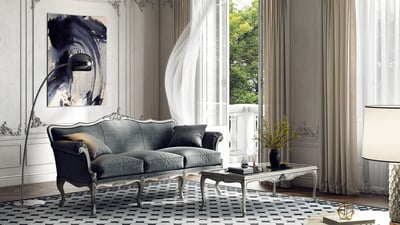
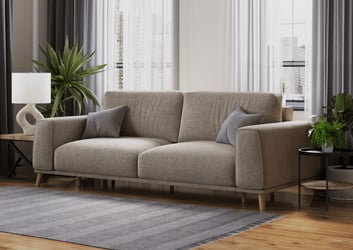
The most frequently requested scene type in furniture CGI, living room scenes are ideal for sofas, sectionals, armchairs, coffee tables, side tables, floor lamps, and accent pieces. Style directions range from contemporary minimalist and Scandinavian to mid-century modern, industrial loft, and warm traditional. A well-composed living room scene should tell the viewer something about the lifestyle the furniture belongs to — and by extension, the lifestyle the shopper aspires to.
Bedroom Scenes
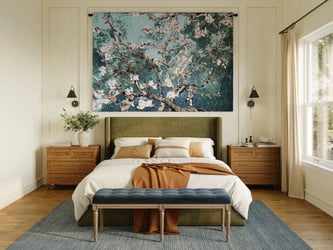
Beds, upholstered headboards, nightstands, dressers, and wardrobes all benefit enormously from bedroom lifestyle scenes. The layering of bedding, throw pillows, and ambient warm lighting in a bedroom render creates an aspirational quality that's difficult to achieve even in professional photography without significant styling budget. Soft natural light from a window, combined with warm bedside lamp glow, is the classic bedroom scene lighting approach that consistently resonates with shoppers. For a deep dive into what makes bedroom CGI convert, see our guide to bedroom furniture rendering.
Dining Room Scenes
Dining tables, chairs, bar carts, buffets, and display cabinets are best understood in a dining context where scale and proportion relative to a room are visible. Dining scenes often include table styling — place settings, fresh flowers, glassware — which elevates the aspirational quality of the image without requiring physical props.
Outdoor and Terrace Scenes
Patio furniture, garden seating, outdoor dining sets, and lounge collections require exterior scene contexts. CGI outdoor scenes can show any season, weather condition, or time of day — a capability no photography can match without multiple shoot days. The same outdoor sofa set can appear in a bright summer afternoon scene and a soft golden-hour evening scene from a single 3D model. The specific material and lighting challenges involved in exterior scenes are covered in our article on outdoor furniture 3D rendering.
Commercial and Hospitality Scenes
Office furniture, hospitality seating, restaurant chairs, and hotel case goods often need commercial-context scenes — lobby settings, meeting rooms, open-plan offices, restaurant floor layouts. These are less commonly done in photography due to location access challenges, making CGI particularly valuable for B2B-facing furniture brands.
Living Room
Sofas, chairs, tables, lighting. Most versatile scene type. Supports all major style directions.
Bedroom
Beds, nightstands, dressers. Warm ambient lighting creates strong aspirational appeal.
Dining Room
Tables, chairs, buffets. Table styling included; scale and proportion clearly visible.
Outdoor / Terrace
Patio and garden furniture. Any season or time of day. No location needed.
The Role of Scene Libraries in Faster Delivery
One of the key reasons lifestyle 3D rendering has become so economically competitive with photography is the scale of digital scene libraries that professional CGI studios have built over years of production. Rather than constructing a unique digital room from scratch for each project, studios can pull from libraries of pre-built scenes, architectural shells, and prop collections to assemble a new scene in a fraction of the time.
Our studio maintains a library of over 39,000 decorative props — from vases, throws, and books to plants, artwork, and lighting fixtures — along with more than 6,000 pre-built 3D scenes covering a full range of interior styles, room types, and architectural contexts. This inventory is the operational engine behind our delivery speed.
With our 39K+ prop library and 6,000+ pre-built scenes, we can produce a complete lifestyle render in as little as 24–48 hours for standard scene types. This is the operational advantage that makes lifestyle CGI viable for brands managing large catalogs on tight launch timelines.
Custom scenes — built entirely to a brand's aesthetic specification, with bespoke architecture, custom prop curation, and unique lighting design — are also available for brands with strong visual identity requirements. Custom scene builds typically add two to three days to the project timeline and come at a higher per-image cost, but produce imagery that is genuinely distinctive and on-brand.
Choosing the Right Style for Your Brand
The style of the lifestyle scene should serve your product and speak to your target customer — not reflect the latest Pinterest trend. A brand selling transitional furniture to a 35–55 suburban homeowner demographic needs different scene aesthetics than a brand targeting young urban apartment dwellers or luxury residential buyers.
Before briefing a lifestyle render project, spend time reviewing your brand's existing aesthetic touchpoints: your website color palette, your current bestsellers, the demographic data from your customer base. If you have a brand mood board, share it. If you don't, creating one from reference imagery is the single most valuable thing you can do before a CGI briefing — it collapses the feedback cycle and produces better first-draft results.
Lighting style is particularly important and often overlooked in briefs. Natural daylight from a large window creates a clean, airy quality that works well for Scandinavian, coastal, and contemporary styles. Warm artificial light from lamps and pendants creates an intimate, cozy quality that suits traditional, farmhouse, and maximalist aesthetics. The same product in the same scene will feel completely different depending on which lighting approach is applied.
How to Brief a Lifestyle Render
A good brief is the fastest route to renders you're happy with on the first review. The information a CGI studio needs to begin a lifestyle project falls into four categories.
Product information: technical drawings or CAD files with precise dimensions, high-resolution reference photos of the physical product (all angles), material specification including fabric/finish codes, and any detail photography of joinery, hardware, or surface texture that needs to be represented accurately.
Style direction: your brand aesthetic, a mood board or reference images for the desired scene style, and any specific requirements around the room type, architectural character, or prop palette. "Contemporary, warm, natural materials, large windows" is a useful brief. "Something nice" is not.
Camera and composition: aspect ratio requirements (1:1 for Amazon main images, 16:9 for website heroes, 4:5 for Instagram), preferred camera angle (eye-level, slightly elevated, wide-angle overview vs. tighter product focus), and whether the product should be the sole focus or shown as part of a broader room scene.
Delivery specifications: image resolution, file format (JPEG for web, PNG for transparency, TIFF for print), color profile (sRGB for screen, Adobe RGB for print), and any platform-specific requirements such as Amazon's 2000×2000px minimum or Wayfair's specific naming conventions.
Lifestyle Renders vs Photography: The Business Case
The financial case for lifestyle CGI versus photography becomes most compelling when you think about the full content lifecycle of a product, not just the initial launch imagery. A product that stays in your catalog for two to three years will be refreshed multiple times: seasonal scene updates, new colorways, promotional imagery, new platform requirements, and campaign creative. Every one of those refresh cycles is a new photography session — or a model update and re-render at a fraction of the cost.
The elimination of location and logistics overhead alone is significant. No studio rental, no location scouting, no set design budget, no prop sourcing, no sample shipping, no travel expenses. These costs don't appear on a per-image invoice but are very real when totaled across a year of production activity.
One lifestyle render project at $200–$400 replaces a $2,000+ styling and photography day for the same product. Over a catalog of 50 products with annual refreshes, this difference compounds into a substantial operational saving — while delivering imagery that meets or exceeds photography quality.
Speed to market has a direct revenue implication that's easy to underestimate. A product that can launch with a full image set in five business days rather than four weeks captures sales during the critical early launch window — a period that strongly influences Amazon search ranking, Wayfair placement algorithms, and DTC conversion rates. The brand that moves faster wins the early organic ranking advantage and rarely gives it back. For brands building out a full image stack — lifestyle renders, silo images, and eventually animation — our guide on what files you need to start a 3D rendering project is a useful starting point before reaching out to a studio.
Platforms and Specs for Lifestyle Images
| Platform | Use Case | Recommended Specs |
|---|---|---|
| Amazon | Secondary images, A+ content | 2000×2000px (1:1), sRGB JPEG; A+ modules up to 1464×600px |
| Shopify / DTC | Hero banners, collection tiles, product pages | 2400×1600px (3:2) or 1920×1080px (16:9) for banners |
| Wayfair | Product listing secondary images | 1500×1500px minimum, JPEG, product lifestyle required for most categories |
| Instagram / Pinterest | Feed posts, shopping ads | 1080×1080px (1:1) or 1080×1350px (4:5) for feed |
| Email marketing | Campaign headers, product modules | 600px wide JPEG optimized for web, 72dpi |
If you're unsure about the specs you need, we deliver each project with a set of pre-sized exports for all major platforms as standard. You get one master high-resolution file plus platform-optimized exports for Amazon, Shopify, and social — no additional requests or file handling needed on your end.
Explore our furniture rendering portfolio for examples across all scene types, or get a quote and describe your product category — we'll recommend the scene approach that best fits your brand and target platforms.
See What Lifestyle Rendering Can Do for Your Brand
We produce lifestyle scenes for all furniture categories — sofas, beds, dining, outdoor, and commercial. Share your product and we'll show you what it looks like in a CGI scene.
Get a Quote