Why Animation Outperforms Static Images on Product Pages
The case for animation in furniture marketing starts with engagement data. Video and animation hold attention longer than static images on product pages, social feeds, and ad placements. Shoppers who watch a product video spend more time on the page, scroll less, and demonstrate lower bounce rates compared to those who only interact with a static image gallery.
For furniture specifically, animation solves communication problems that static images can't. A still photo of a sofa shows the front. An animation can reveal the depth of the seat cushioning, the way the fabric catches light from different directions, the scale of the piece relative to a room, and the quality of the stitching — all in a few seconds. This is information that previously required a showroom visit to communicate effectively.
The second advantage is differentiation. Product listing pages on Amazon and Shopify are competitive environments where most competitors show the same format: hero image, white-background silo, a lifestyle shot. A brand that fills the Amazon video slot with a polished product animation stands apart visually before a shopper has even read the title or price. In high-competition categories — seating, bedroom furniture, accent tables — this visual distinctiveness is a meaningful conversion driver.
Types of Furniture Animation: Choosing the Right Format
Not all furniture animations serve the same purpose. The right format depends on what you're trying to communicate and where the animation will be used. Here are the five primary types relevant to furniture eCommerce:
Turntable Spin
The simplest and most commonly requested format: the camera orbits the product slowly through 360 degrees while the product sits in a neutral or lifestyle environment. The turntable spin is the direct video equivalent of a 360° spin set — it shows every angle of the product without the shopper needing to interact. It works on every platform that accepts video, requires no interactivity support, and is the most straightforward starting point for brands new to animation.
Lifestyle Camera Move
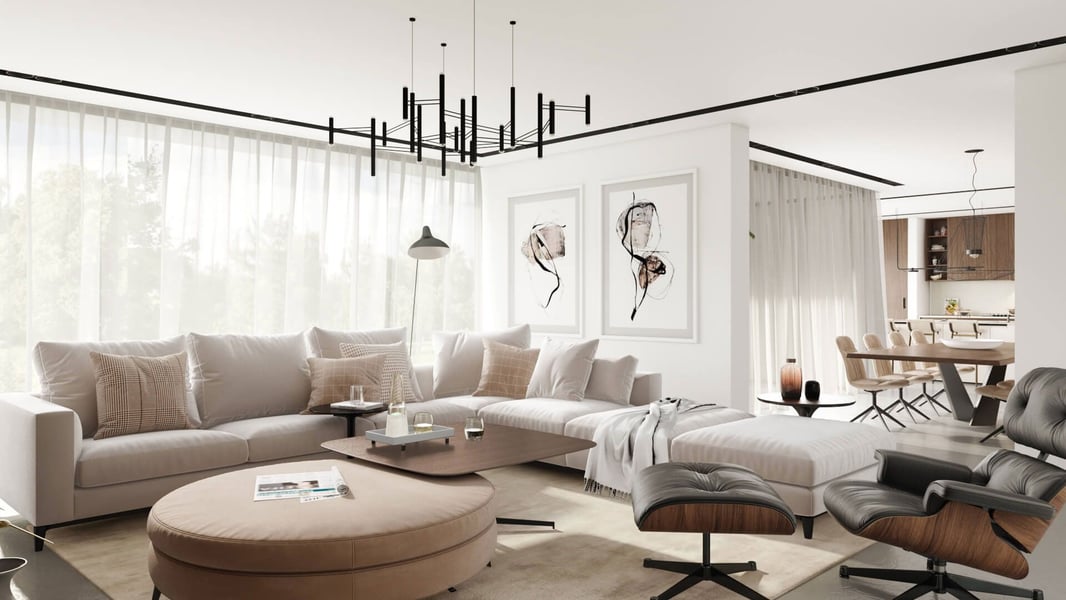
Rather than orbiting a neutral product, a lifestyle camera move places the product in a fully styled room environment and moves the virtual camera through the space — pulling back to reveal the full room, pushing in to highlight a detail, panning across to show how multiple pieces in a collection relate to each other. This format conveys aspiration and helps shoppers visualize the product in context, which is particularly effective for hero pieces like sofas, beds, and dining sets.
Assembly or Mechanism Animation
For products with moving parts — extendable dining tables, convertible sofa beds, adjustable shelving, storage ottomans — a mechanism animation shows the function clearly. This is particularly valuable on Amazon, where shoppers often have specific questions about how a mechanism works and are reluctant to purchase without seeing it demonstrated. A 10-second clip showing a table extending from 60 to 84 inches answers more questions than any written description.
Feature Highlight Animation
A close-up animation that draws attention to a specific quality detail: the joinery on a solid wood frame, the hand-stitching on an upholstered headboard, the soft-close mechanism on a drawer. Feature highlights work well as secondary videos on a listing page and as social media content where the goal is to communicate craftsmanship rather than drive immediate conversion.
Material Variant Showcase
An animation that transitions the product smoothly between finish or fabric options — a sofa morphing from sand to charcoal to sage, or a dining chair cycling through wood stain options. This format is particularly effective on Shopify product pages with variant selectors, and on social ads targeting shoppers who are in the consideration phase and comparing options.
Where to Use Furniture Animation: Channel by Channel
Each sales and marketing channel has different technical requirements and different contexts for animation:
Amazon: Amazon allows one video per product listing, accessible through the main image gallery. Amazon accepts MP4 files and recommends 1920×1080 resolution. The video appears prominently in the gallery and is one of the highest-value placements available on the platform. For furniture sellers, this slot is often filled with a turntable spin or a lifestyle camera move of 15–30 seconds.
Shopify: Shopify product pages support video in the product media gallery natively. A looping animation as the first media item in the gallery can significantly increase dwell time compared to a static hero image. Some themes also support video in hero sections or feature blocks, allowing animations to appear in promotional contexts beyond the product page itself.
Instagram Reels and TikTok: Short-form vertical video platforms reward visually compelling content with organic reach. A 9:16 format crop of a lifestyle camera move, or a quick 15-second feature highlight, performs well as organic brand content and as paid advertising creative. The production cost of adapting a 16:9 CGI animation for vertical formats is relatively low once the base render is complete.
Meta (Facebook and Instagram) ads: Video ads in the feed and story placements consistently outperform static image ads for furniture in the consideration and retargeting phases. A 15-second turntable loop works as a prospecting ad; a lifestyle camera move with a room reveal works for retargeting audiences who have already visited the product page.
Amazon allows one video per listing — brands that fill this slot with a polished 15–30 second product animation report significantly higher click-through and conversion compared to listings without video. In competitive furniture categories, leaving this slot empty is a missed opportunity that competitors will exploit.
How Furniture Animations Are Produced from 3D Models
Furniture product animation starts from the same 3D model used to produce lifestyle renders and silo images. This is a critical point for brands evaluating the cost of animation: if you already have production-quality 3D models for your products, the cost of producing animation from those models is significantly lower than starting from scratch, because the modeling phase (typically 40–60% of the total project cost) is already complete. Brands that have not yet started building a 3D model library should read our guide on what files you need to start a rendering project — the same inputs drive the animation pipeline.
The animation production process from an existing 3D model typically follows these steps:
- Scene setup — the product model is placed in an environment appropriate for the animation type (neutral infinite ground plane for a turntable, fully styled room for a lifestyle move, close-up lighting rig for a feature highlight)
- Camera path animation — a virtual camera is programmed to move through the scene over the animation's duration, with keyframes defining the camera position, angle, and focal length at each point in the sequence
- Lighting and material check — lighting is evaluated in motion, since dynamic lighting reveals different material qualities than a static render; adjustments are made to ensure the product reads correctly throughout the camera move
- Frame-by-frame rendering — the animation is rendered at the target frame rate (typically 24 or 30 fps), generating hundreds or thousands of individual frames depending on the duration
- Post-production — frames are compiled into a video, color-graded, and optionally enhanced with motion graphics, text overlays, or music for platform-specific versions
The render time for animation is substantially higher than for still images — rendering 900 frames for a 30-second animation at 30fps requires far more compute time than rendering 5 still images. Professional studios use render farms (distributed across many machines simultaneously) to deliver animations on reasonable timelines. You can explore our product animation service and view examples of different animation types in our portfolio.
Length, Format, and Optimal Durations by Platform
| Platform | Recommended Length | Format | Aspect Ratio |
|---|---|---|---|
| Amazon product video | 15–30 seconds | MP4 | 16:9 (1920×1080) |
| Shopify product gallery | 10–20 seconds (looping) | MP4 or MOV | 1:1 or 16:9 |
| Instagram Reels / TikTok | 10–20 seconds | MP4 | 9:16 (1080×1920) |
| Meta feed ads | 15–30 seconds | MP4 | 1:1 or 4:5 |
| Meta story / reel ads | 10–15 seconds | MP4 | 9:16 (1080×1920) |
| Website hero / banner | Looping 5–8 seconds | MP4 (autoplay, muted) | 16:9 or custom |
For efficiency, brands typically commission the master animation in 16:9 format at full resolution, then crop or reformat for vertical platforms in post-production. Most CGI studios offer multi-format delivery as a standard part of the animation package — the incremental cost of adding a 9:16 crop is minimal relative to the total production cost.
Cost Range and Turnaround Expectations
Animation costs vary based on complexity, duration, and whether an existing 3D model is being used or needs to be created from scratch. General benchmarks for furniture product animation:
- Simple turntable (15–20 seconds): $300–800, using an existing 3D model. This is the entry-level format — camera orbits the product in a clean environment. Fast to produce, versatile for use across platforms.
- Lifestyle camera move (20–30 seconds): $800–2,500, depending on scene complexity. A fully styled room environment with a moving camera is more involved — scene assets need to be assembled, lighting must be calibrated for the camera path, and render time increases with scene complexity.
- Mechanism or assembly animation (15–30 seconds): $600–1,800, depending on the complexity of the mechanism being animated and whether rig setup is required.
- Material variant showcase (15–20 seconds): $400–1,000 for 3–5 variants cycling in a single animation, using existing material maps.
Turnaround times for furniture animation typically run 5–10 business days from brief approval to final delivery, assuming an existing 3D model is being used. Projects that require new 3D model creation first should budget additional time for the modeling and approval phase before animation production begins.
Ready to Get Your Furniture CGI Quote?
Send us your product specs and we'll prepare a personalized rendering quote within 24 hours.
Request a Free Quote →Getting the Most From Your Animation Investment
A few practical principles for brands entering furniture animation for the first time:
Start with your highest-traffic listings. The conversion lift from animation is most visible on products that already attract significant traffic. Prioritize your top 5–10 Amazon ASINs or Shopify products by sessions — these are where animation will generate the most measurable return in the shortest time. The same 3D model that powers your animation can also generate AR models for mobile try-before-you-buy visualization, amplifying the return on your model investment further. Brands managing large catalogs should also review how 3D rendering supports efficient catalog scaling — animation is most impactful as part of a broader visual asset strategy, not as a standalone deliverable.
Combine animation with still renders in a single production order. If you're commissioning a lifestyle camera move for a product, have the studio capture still frames from the animation as lifestyle images. Many frames within a well-produced camera move are high-quality still renders in their own right. This dramatically increases the asset output per production dollar.
Plan for multi-platform delivery upfront. It costs very little to export an additional aspect ratio at the time of production. Deciding to add a 9:16 version after delivery typically requires going back to the source files and re-rendering, which is both slower and more expensive. Brief the studio on all platforms you intend to use before production begins.
For brands building out a comprehensive visual strategy, our guides on silo vs. lifestyle renders and lifestyle 3D rendering for furniture cover the still image foundation that animation builds on. Animation is most effective when it complements a complete image set — it's not a replacement for strong static images, but a significant multiplier on top of them.